Building an AI Director for Continuous Video Generation
In this post we’ll learn how to create arbitrary length, continuous one-shot videos in an entirely automated fashion using only open models and open source tools by exploring my newest project WeirdDream which is tool for generating content for a TikTok channel of “AI dreams” entirely on my local machine! You can see an example from the channel below:
I’ve spent a lot of time working in the AI space: shipping AI focused products for a Bay Area startup, being founding engineer at a research intensive startup focusing on open model work, partnered with Hugging Face on evaluation research, currently wrapping up a book on open model image generation, and have even lectured with Andrew Ng on structured outputs for LLMs! Despite all this experience, I still feel like I’m just starting to see what interesting possibilities there are with this technology. I’ve long felt AI is simultaneously over-hyped and under-explored.
But what has always attracted me to tech is that we can explore by building! So see if we can’t make something fun and interesting while learning about what AI can really do along the way!
Dreaming of AI Dreams
A good chunk of my free time the last few years has been working on A Damn Fine Stable Diffusion Book. Since I first sat in front of a Tandy 1000 as a child, I always wanted my computer to draw for me. The fact that I can tell my computer to just make an image of something is incredibly rewarding and writing the book has been an incredible journey in realizing this dream!
While writing the book I started playing around with local AI video generation. Here is an example of an early video I made of my dog Keats (using an image also created with local AI and a locally trained LoRA):
Very short video created using local open models
The video is short, around 3 seconds, and this is no accident. Wan 2.2 is amazing but in general cannot create coherent videos much longer than 5 seconds. Even the most powerful commercial offerings cannot create continuous video for longer than about 20 seconds.
Creating longer videos
In pursuit of a work around for being able to create only very short video, I started to think creatively about how I could better make use of these tools. Wan 2.2 works as an Image-to-Video model (also has a text-to-video variant), normally this means you need to provide an initial image for the first frame and a prompt for what you want to happen. Thanks to the power of ComfyUI (discussed in a bit more detail later), we can also save the last image from the generation as shown in the screenshot below:
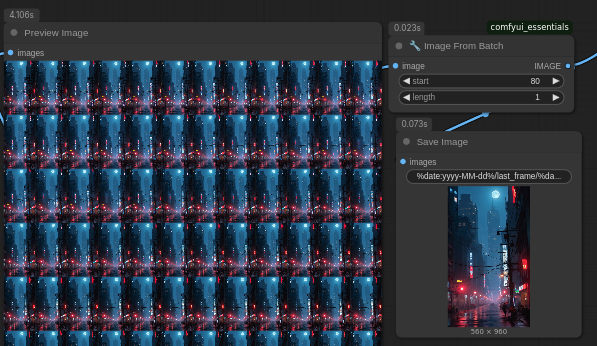
This allows us to reuse that last frame as the first frame in the next generation. By repeating this process we can produce much longer videos!
Now the challenge is we still need to continually prompt for each 5 second section. This can’t easily be done in advance because you really need to see what that last frame is in order to direct the next sequence. I decided to have fun with this and intentionally try to take the video on a strange visual journey; taking advantage of the fact that each 5 second sequences has no context of the others. Below is a 2:42 minute video created this way (something that is currently not possible with proprietary AI video generators even the impressive Seedance 2.0 caps out at 20 seconds):
Long video created by stitching together individual scenes manually.
I really loved the experience of making that video and the result had me laughing for quite a while. But the process was extremely time consuming. Each section can take 15-20 minutes to generate on local hardware, and then I had to manually load the next image and adjust the prompt. This meant that I couldn’t step away from my computer for long without slowing the whole process down. So we can make longer form video, but it requires a lot of tedious manual intervention.
Solving automation with multiple AI strategies
ComfyUI has been an incredible advancement in building generative AI workflows, allowing users to visually build complex graphs for generating images and videos. But even ComfyUI couldn’t handle the level of automation I wanted to see for this to be fully self-driving. The ComfyUI cli does allow for running workflows from the command line, but there’s no way to parameterize a workflow and pass in things like prompts.
It turns out that ComfyUI does have a local API server that allows you to programmatically pass in workflows to run, so you can write a Python script that could handle the prompts. But this leaves the problem that I still have to prompt at each segment generation step. That’s when I realized that a multi-modal LLM sincerely opened up a software option that was not there before. Now I can pass the image to an AI and let it prompt for me, completely automating the process! By incorporating an AI Director (powered by Kimi k2.5).
As much attention as vibe coding gets, it’s this latter use case that I find more interesting. Maybe vibe coding gets things done faster (in some cases), but those things could still be done. Without a AI director it would not be possible to automate this step!
Here we can see the first video created through this process:
First complete video to be created by WeirdDream (sound added in TikTok)
These videos are weird, but that is entirely the intention! I’m fascinated by the way the scenes shift over time in both obvious and eerily subtle ways. I’m a strong believer in taking as much advantage of the media you’re working in and its unique properties as you can. In the same way pixel art and even jpeg artifacts have an aesthetic, so too do these strange AI dreams.
How WeirdDream was built and how it works
With the rise in "vibe” or “agentic” coding, describing the process of creating something is increasingly more important than the code itself. WeirdDream is especially interesting because it combines three distinct uses of AI:
Coding agent (I didn’t write or edit a single line of code for this project)
Diffusion models for image/video generation
Multi-modal LLM call to direct each video segment
All of these AI components working together is interesting because it really does allow us to write novel software that simply couldn’t have existed 5 years ago!
Below is an image of the entire architecture of WeirdDream:
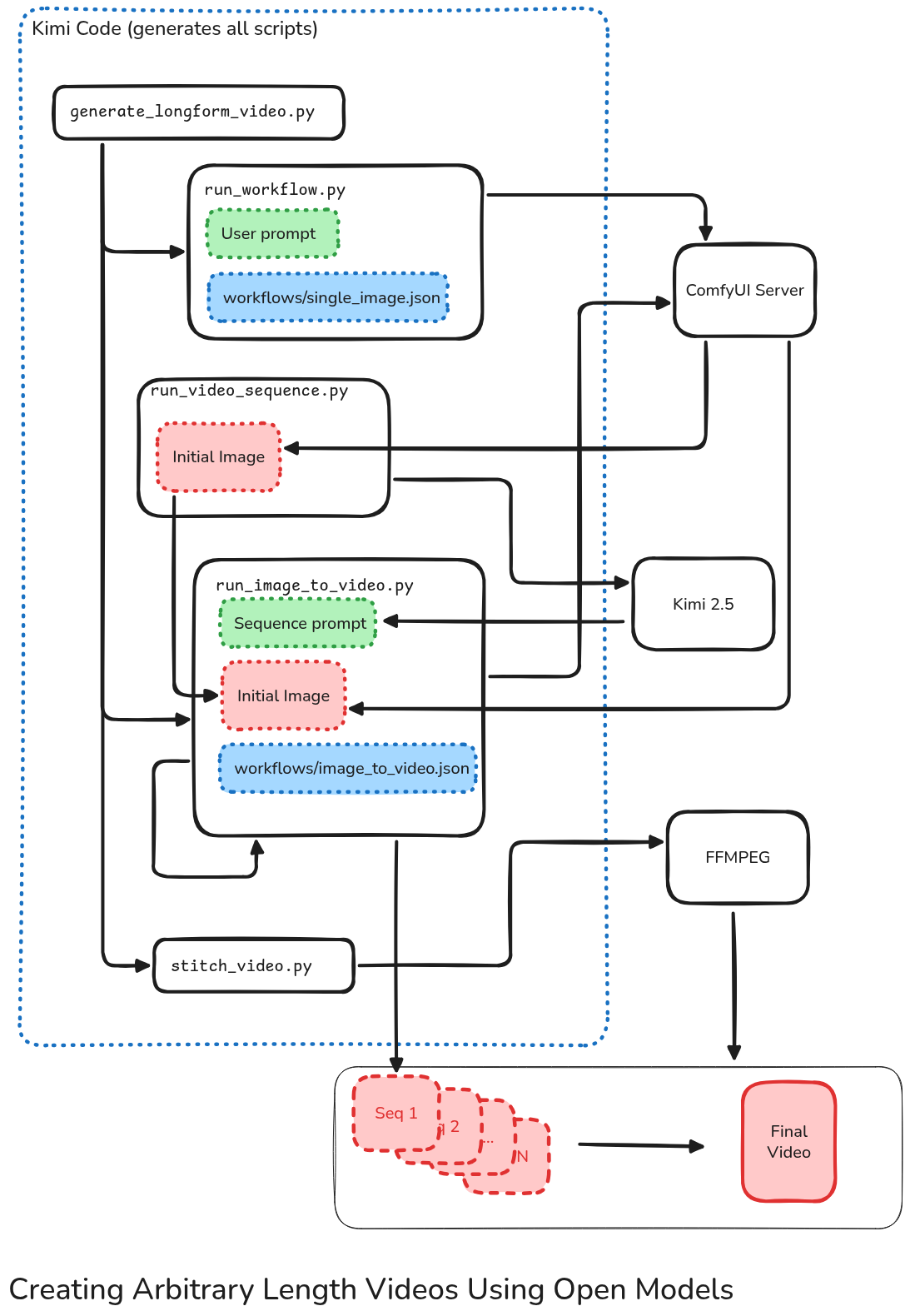
Thankfully AI built nearly all of this for me!
Let’s dive into the detail a bit! Despite it’s relative complexity, AI was able to do the vast majority of the work for me, I just need to have a mental model of how these pieces should fit together to make that happen.
Open models and Open source tools
One area of AI that I do have aggressive opinions on is open models. For me the dividing line between AI dystopia and any alternative is our individual control and ownership of these models. If OpenAI and Anthropic have absolute control over AI, our future is grim. Alternatively, open models combined with open source tools provide unbounded options for customization and tweaking.
Before diving into the details of how WeirdDream videos are created, let’s look at the basic stack:
Initial starter image generated with Flux
Video segments are generated with Wan 2.2
ComyUI is used to design the workflows for image/video generation
Coding entirely performed by Kimi Code* from Moonshot.ai
Prompts generated with Kimi k2.5 multi-modal*
ffmpeg to actually put it all together!
All image/video generation is performed locally. The ‘*’ around Kimi is because I am making use of their paid API since running this locally would require much more hardware than I can afford right now. However I still want to give Kimi and the team at Moonshot.ai credit because if WeirdDream were to take off and become insanely profitable, I 100% could run every part of my AI system locally on hardware I have 100% control over. This is simply not an option with proprietary models. If you build a company of OpenAI or Anthropic, no matter how successful you are, you will remain tied to those platforms.
So while not everything is running locally, every component is open.
Vibe Coding with Kimi Code CLI
WeirdDream was built 100% with AI written code (aside from the ComfyUI workflows used, which I had made previously). I’m well aware of the slop-horrors AI code can reap on production systems, but I purposefully wanted to build this without coding at all. I was very impressed with the results, making me very hopeful for the future of open models (even if they’re a bit tricky to actually get running locally).
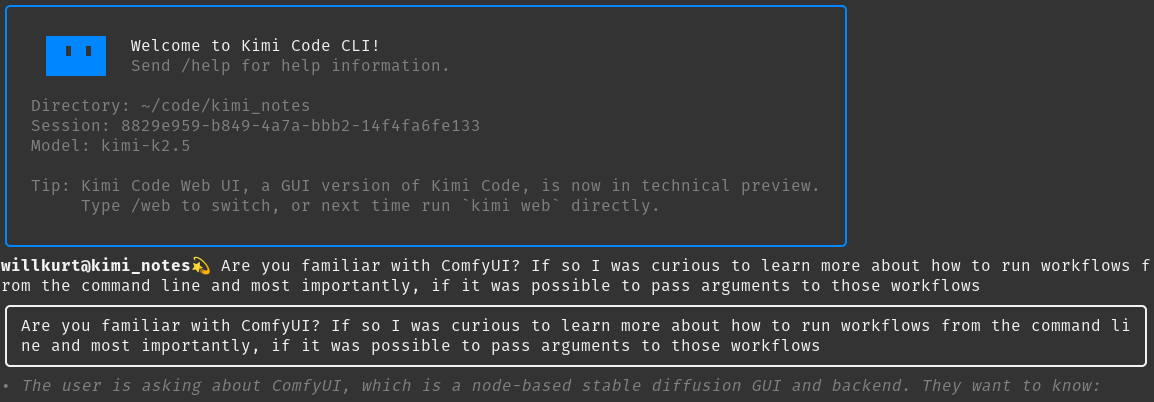
The Kimi Code CLI is very intuitive for anyone coming from Claude Code
Kimi Code CLI works more or less the same as other command line coding assistants. Kimi 2.5-Thinking was excellent and was able to easily (and quickly) process the fairly large set of documentation around ComfyUI workflows. But with all that I still haven’t excused the initial context Window!

Consumed a ton of documentation and still have a ways to go before worrying about context!
Before diving into the details of what I build with my AI coding agent, I want to discuss the real meat of this project which is the underlying ComyUI workflows.
ComfyUI workflows
For those unfamiliar, ComfyUI is a tool to allow the visual layout of the often complex workflows required for highly custom work with Image/Video generation models. Below is a screenshot showing a zoomed out view of the workflow for taking an image and creating 5 second video segments:
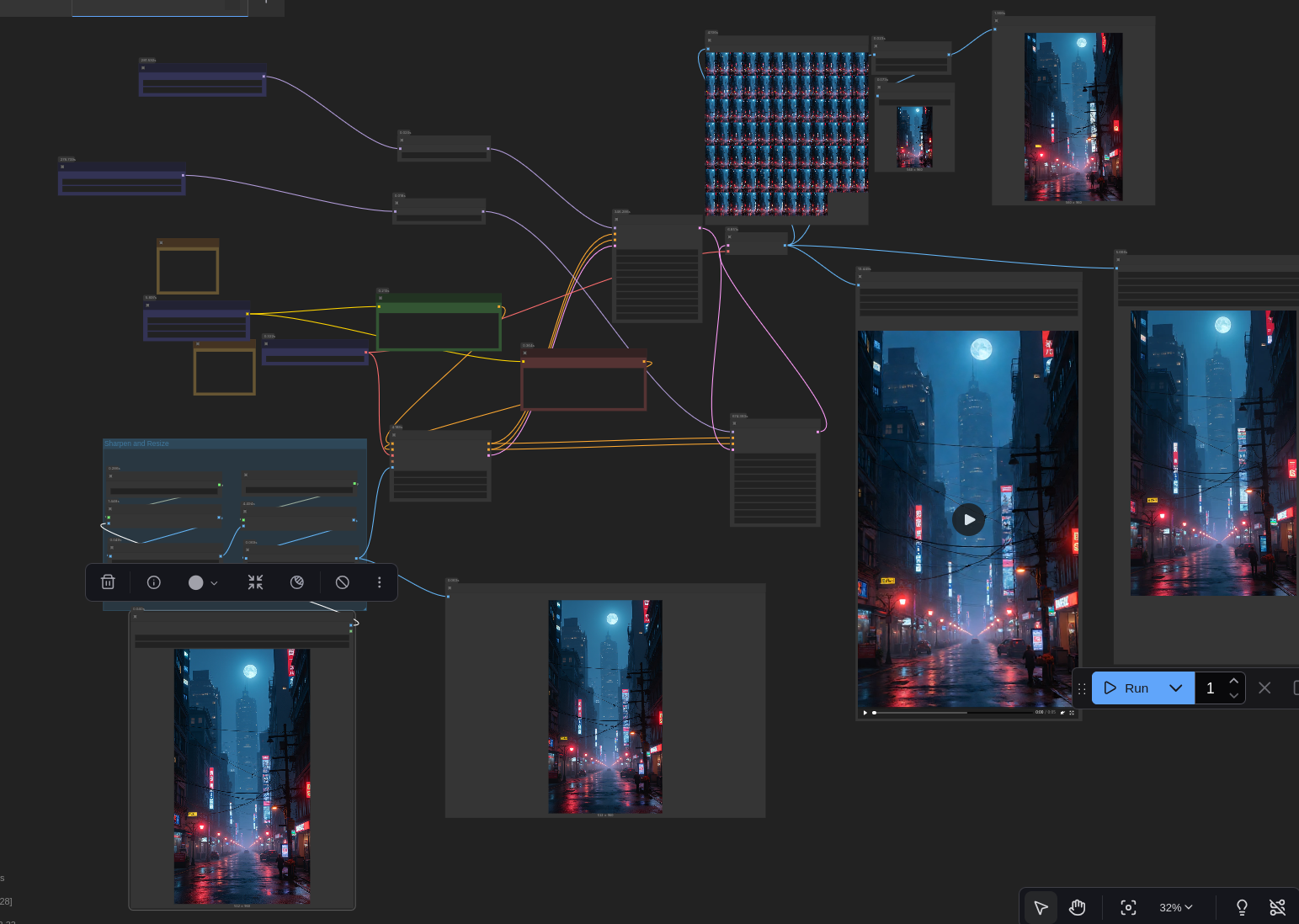
ComfyUI workflows are incredibly useful and can quickly grow quite complex.
As mentioned earlier: ComfyUI workflows are incredible for making working with diffusion models easier, but still have limitations for more complex automation.
Workflows can be run through the command line interface that ComfyUI offers, but a major draw back of this approach is that these workflows cannot easily be parameterized. Thankfully they can be exported to JSON and ComfyUI also serves as an API endpoint when running. This means all we really need are a bunch of thin Python wrappers around these workflows to make them easy to parameterize and manipulate.
Unfortunately, that involves a lot of tedious documentation reading and essentially boiler plate coding. Fortunately, we have great, open weights, coding agents that are particularly well suited for this task!
Successful Vibe Coding
I’ve been running WeirdDream pretty much constantly for the last couple of days and the only problem I’ve had has been related to ComyUI’s server crashing sometimes, everything Kimi wrote has worked great. I like to believe (but am not frothing at the mouth in certainty) that my approach to building this solution is part of the reason why
WeirdDream is made up of a series of single purpose scripts. Each one solves a basic subproblem:
run_workflow.py - a simple script for parameterizing the prompt of a workflow, used to generate the initial image to start the video generation process.
run_image_to_video.py - similar to the workflow script, but specific to image to video generation taking both a prompt and the initial image path.
run_video_sequence.py - Iteratively run the previously mentioned video generation script and, most importantly, handles prompting the “AI Director” for a prompt based on the last frame (or first input image) generated.
stitch_video.py - Very simple script that passes all the output segments into FFmpeg to make the final video.
generate_longform_video.py - Script that ties all the other pieces together and handles keeping track of various folder and file locations.
This loosely feels similar to what I like about functional programming: keep everything simple and focused on each individual components inputs and outputs (also it still largely obeys referential transparency: if you run each script with the same input, you’ll get the same output). This also means that the system is fairly modular and if it does break, I can always focus on fixing a single script. I’m perfectly comfortable with my program being largely black boxes, as long as those black boxes have specific roles and are isolated from the other black boxes. I believe back in the 1990s we could have referred to these as “agents”... but that will only confuse things today.
The AI Director
The “AI Director” in this initial pass at WeirdDream is very simple: it looks at the image, and comes up with a prompt to pass into the Wan 2.2 I2V workflow. The AI director is instructed by some “meta-prompts” (system and user) that live in separate text files for easy editing. For the current iteration the ‘user’ prompt is:
Analyze this image and write a video generation prompt, make sure the scene described is a bit creepy. The style should be grainy and realistic. Atmospheric with a sense of horror but nothing too obvious.Changing that is pretty straightforward and can have a dramatic impact on the final result. For example, to get a less “surreal” video I changed the prompt to this:
Analyze this image and write a video generation prompt, it's part of a sequence of images. If the image appears to have a crow in it, prompt to have the crow fly away off scene. If the image does NOT have a crow in it, prompt for a crow to fly from off screen and land. Otherwise try to keep the rest of the image reasonably consistent and don't change the scene too drastically. Make sure the image is not too dark, that is if the image is dark try to prompt for the image to be lighted slightly.Then, prompted for an initial image of a crow, we get a long and suprirsingly consistent result:
As you can see, even a simple change in the prompt suddenly gets us much more predictable and stable results while still maintain the one-shot, longer nature of the video.
While the current iteration of this AI Director has no knowledge of the past (or the future direction) of generation, it’s not hard to imagine this getting much more sophisticated. Again, for this current iteration I want weird morphing properties, but it’s easy to imagine how this could be removed:
Provide context around previous images
Allow the Director to reject and rerun the generation if the final frame is unsatisfactory
Inform the Director what stage in the process it’s in, remind it of an overall narrative
Enable the Director to share narrative information between generations
When you look at how powerful Seedance 2.0 is, it’s not hard to imagine that power combined with these techniques could lead to much more than “weird dreams” coming out of these models!
Conclusion
Reflecting on this project and doing this write up has shifted my view of the future of AI software somewhat. So much online discussion is about whether or not AI can replace software engineers but this discourse slightly misses the mark. The ability for anyone to create a bespoke solution to virtually any software problems is the much larger threat to the future of software than automating away an actual developer. For the things developers build (traditional stable software projects), you still need (AI-assisted perhaps) real developers. But the ability to create bespoke software that solves your problem good enough, eliminates the need for a lot of the stable software projects developers build.
There is no need for me to release the code for this project because it would be a far better solution for you to simply rebuild it exactly as you want it. The entire thing cost me barely a few bucks and it does everything I want the way I want. This software doesn’t have to be robust and run on other platforms. If this code “works on my machine”, that’s perfect! For most of it’s history software engineering has focused around building stable and scalable systems. At this point we almost assume that there is no alternative. WeirdDream is exactly the tool I need and works exactly the way I want. Telling you how to replicate it for yourself is far closer to “shipping” than provide code that wouldn’t be as good.
And weirdly, this TikTok channel I built? I don’t really mind if no one else enjoys watching it. It’s currently my favorite TikTok channel, and I can continue to make it the way I want. It’s not hard to imagine a world where even TikTok is rendered entirely unnecessary as I could just serve up an endless steam of content created exactly as I imagine it should be. A future both wondrous and terrifying.
Want to learn more about Stable Diffusion and open image generation?
Then check out A Damn Fine Stable Diffusion Book being released by in print by Manning soon! The preview version of the nearly complete book is available today!